Welcome to ClassicPress, @Byron !
2 Likes
Plugins/ features and their work ability is pretty much a question of trial (and sometimes, many) error.
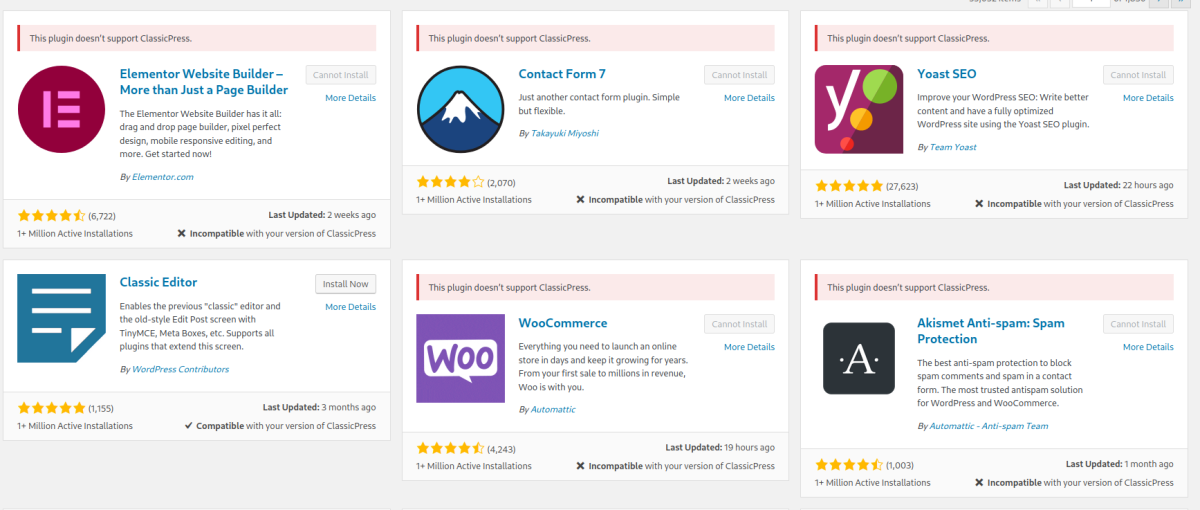
Typically I have learnt to respect the alert on the WP Plugin directory: If it says "Not compatible" with ClassicPress, the plugin will most likely not work. (Link to a screenshot for my blog, posting image only)
Shortpixel, smush (image), Updraft Plus (backup), WP Rocket/ Autoptimize typically work well, I have not been able to get SEO press, Modula (Image gallery) to work.
If you really need it for a valid reason, leaving the debug on and then popping the question into a GPT (I use Claude) often yields in some solution for me.
Same goes for themes. Best wishes.
3 Likes
Hey Vyas,
Yes, I am also using UpdraftPlus Premium on CP, and works perfectly. I found the only plugin we needed to abandon was Elementor (which is fine by us).
For SEO press I am wondering if there is any chance you can import the SEO data into one of the CP SEO plugins. It’s a longshot but thought I’d mention them:
(ping @Ciprian on this one)
(Importers for Rank Math, Yoast, All In One SEO and The SEO Framework)
Cool use of the AI R&D btw. 
1 Like
W3P SEO does not have an automated migration feature, but a manual one.
It shows Yoast/RankMath description for each page, so you can manually copy and paste it into W3P SEO fields, before disabling Yoast/RankMath.
It’s part of my “keep it simple” mindset.
1 Like
@Web242, Many thanks for the suggestion and the kind words…
Incidentally, SeoPress ( + Pro) seem to work well with a WP 6.6.2 site, migrated to CP 2.2 using the plugin. It enabled me to migrate my main author site to CP 2.2 this afternoon. Long story behind the reasons for doing so, but suffice to say it involved plenty of testing, a few minor hiccups.
Except for a couple of “Gutenburg friendly plugins”, I can confirm working without hiccups Modula (+ Pro), Happy files, Schedule Press (+Pro) Form Maker Pro, and a few others- I should probably post them in the relevant discussion thread, but PHP was 8.3 Nginx on Ubuntu 20.04. Might test other combinations of PHP versions / web servers as time permits.
I consider it Deepawali festival gift - on that note, best wishes to the community !
p.s: most “fun” use case of AI was creating an agent whose sole purpose in life was to strip the wordpress code from blog posts, and re format the content in raw HTML5.
2 Likes
@avyas Vyas, glad to help.
For Form plugins, FluentForms and WP Forms work with CP. I am partial to FluentForms and it has a built-in migrator as well.
You can probably find an equivalent to other plugins as well. Just takes a lite R&D and searching here in the forums.
1 Like
I hope I’m allowed to promote my own services.
I have created an online repository of compatible ClassicPress themes and plugins. I started with my own plugins, and the WordPress plugins I’m currently using (and are compatible with CP).
If you want to search for something or add links to your own (or tested) resources, try this -
1 Like
Hi Ciprian, great idea! I don’t think anyone here minds at all - not like I’ve ever promoted my services. 
You might want to check your responsive settings though - working on desktop but not Android.
I looked for a download link on ‘List Subpages’ but was unable to find one. I’d like to evaluate it as a replacement for an old, unsupported plugin I use.
@raygulick You are absolutely right, I got the plugin from an existing website of mine, and simply copied the author’s URL.
See below the plugin code (one file - looks a bit old, though):
<?php
/*
Plugin Name: List Subpages
Plugin URI: http://robm.me.uk/projects/plugins/wordpress/list-subpages/
Description: Adds a post tag that lists the sub pages of the current page, allowing you to use parent pages in a similar way to categories.
Author: Rob Miller
Version: 2.1
Author URI: http://pwnt.co.uk/blog/
*/

/**
 * Generates and optionally outputs the hierarchy of pages corresponding to the current one.
 * @param string $query
 * @return string The generated hierarchy.
 */
function list_subpages( $query = '' ) {
	global $wpdb, $post;

	parse_str($query, $q);

	if ( empty($q['child_of']) && empty($post->ID) )
		return;

	$defaults = array(
		'child_of' => $post->ID,
		'echo' => 1,
		'title_li' => '',
		'depth' => 0,
		'include' => '',
		'exclude' => ''
	);
	$options = array_merge($defaults, $q);

	// See if there are any subpages of this page
	$subpages = $wpdb->get_var("
	SELECT COUNT(*) FROM $wpdb->posts
	WHERE post_parent = '{$options['child_of']}' AND post_status = 'publish' AND post_type = 'page'
	");

	if ( $subpages <= 0 )
		return;

	$query = 'echo=0&';
	foreach ( (array) $options as $key => $value ) {
		if ( $key != 'echo' )
			$query .= "$key=$value&";
	}

	$html = "
		<ul>
	";

	$html .= wp_list_pages($query);

	$html .= '
		</ul>
	';

	if ( $options['echo'] )
		echo $html;
	return $html;
}

/**
 * Filters post content and, if the post is static and contains the list subpages tag, replaces the tag with the generated hierarchy.
 * @param string $content The content of the post that we're filtering.
 * @return string The newly-filtered post content.
 */
function parse_list_subpages( $content ) {
	global $wpdb, $post;

	// The way static pages are handled changed between 2.0 and 2.1.
	$static = ( $post->post_status == 'static' || $post->post_type == 'page' );
	// Only parse pages, not regular posts.
	if ( !$static )
		return $content;

	$attributes = array('full', 'depth', 'order', 'class', 'exclude', 'show_date',
	'date_format', 'child_of', 'title_li', 'authors');

	// Parse out our tags.
	preg_match_all('#<subpages([^>]*)/>#si', $content, $tags, PREG_SET_ORDER);

	foreach ( $tags as $tag ) {
		foreach ( (array) $attributes as $attr ) {
			preg_match('#' . preg_quote($attr) . '="([^"]+)"#i', $tag[0], $m);
			if ( !empty($m) )
				$$attr = $m[1][0];
		}

		$query = 'echo=0';
		if ( empty($child_of) )
			$query .= "&child_of=$post->ID";
		if ( empty($title_li) )
			$query .= "&title_li=Subpagini ale %E2%80%9C{$post->post_title}%E2%80%9D:"; // Ugh, URL encoding.

		foreach ( (array) $attributes as $attr ) {
			if ( !empty($$attr) ) {
				$value = $$attr;
				$query .= "&$attr=$value";
			}
		}

		$subpages = list_subpages($query);
		$content = str_replace($tag[0], $subpages, $content);
	}

	return $content;
}
add_filter('the_content', 'parse_list_subpages');


/**
 * Adds a button to the posting toolbar for easy insertion of the list subpages tag.
 */
function list_subpages_button() {
	if ( strpos($_SERVER['REQUEST_URI'], 'page-new.php') !== false ||
		 strpos($_SERVER['REQUEST_URI'], 'post.php?action=edit') !== false ) {
		echo '
			<script language="javascript" type="text/javascript"><!--
			var toolbar = document.getElementById("ed_toolbar");
		';
		edit_insert_button('subpages', 'list_subpages_button', 'Creates a list of subpages at this point');
		echo '
			function list_subpages_button() {
				edInsertContent(edCanvas, "<!-"+"-subpages-"+"->");
			}
			//--></script>
		';
	}
}

if ( !function_exists('edit_insert_button') ) {

	function edit_insert_button( $caption, $js_onclick, $title = '' ) {
		echo "
			if (toolbar)
			{
				var theButton = document.createElement('input');
				theButton.type = 'button';
				theButton.value = '$caption';
				theButton.onclick = $js_onclick;
				theButton.className = 'ed_button';
				theButton.title = '$title';
				theButton.id = 'ed_$caption';
				toolbar.appendChild(theButton);
			}
		";
	}
}
add_filter('admin_footer', 'list_subpages_button');
And below is something I am using on a few other websites. Pretty simple code:
function w3p_subpages( $atts ) {
    global $post;

    $attributes = shortcode_atts(
        [
            'orderby' => 'menu_order',
        ],
        $atts
    );

    $args = [
        'post_type'      => 'page',
        'posts_per_page' => -1,
        'post_parent'    => $post->ID,
        'post_status'    => 'publish',
        'orderby'        => $attributes['orderby'],
    ];

    if ( sanitize_text_field( $attributes['orderby'] ) === 'menu_order' ) {
        $args['order'] = 'ASC';
    } elseif ( sanitize_text_field( $attributes['orderby'] ) === 'modified' ) {
        $args['order'] = 'DESC';
    }

    $parent = new WP_Query( $args );
    $out    = '';

    if ( $parent->have_posts() ) {
        while ( $parent->have_posts() ) {
            $parent->the_post();

            $out .= '<div id="post-' . $post->ID . '" class="post-' . $post->ID . ' post type-page status-publish format-standard hentry">
                <h2><a href="' . get_permalink( $post->ID ) . '" rel="bookmark" title="' . get_the_title( $post->ID ) . '">' . get_the_title( $post->ID ) . '</a></h2>

                <p class="has-small-font-size" style="line-height:1">
                    ' . get_the_modified_date( get_option( 'date_format' ) ) . '
                </p>

                <div class="entry">
                    <p>' . w3p_get_excerpt( $post->ID ) . '
                </div>
            </div>';
        }
    }

    wp_reset_postdata();

    return $out;
}

add_shortcode( 'subpages', 'w3p_subpages' );
1 Like
Thanks!
1 Like
It seems registering as a new user is not working … the button keeps saying “registering” but never goes further.
It’s beta! Thanks for reporting it, I have just finished coding a front-end login/registration plugin. Give me until tomorrow to fix it 
EDIT: It’s fixed!
1 Like
Hi Byron - I’ve just fixed a couple of glitches in ACF Pro. Happy to share if you’ve seen the same issues and you’d like the CSS
Hi, that would be great, thank you 
Adding this CSS in style-admin.css fixed my issues: Page editor CSS fixes for ACF Pro in ClassicPress 2.20 — Bitbucket
2 Likes

Hi Nick, thank you for that
.metabox-holder .postbox-container .meta-box-sortables{outline:none!important}
Will also get rid of the dashed outline in the Add New Field Group area.
1 Like
Awesome, thanks 
SCF Pro seems to run smoothly on CP 2.2.
1 Like
I would suggest changing that CSS so that you don’t cause problems for yourself on other pages. This should keep it to ACF/SCF pages:
.acf-admin-5-3 .metabox-holder #postbox-container-1 .meta-box-sortables{outline:none!important}