When updating a page, html markup should be saved along with normal text.
Current behavior:
When updating a page, html markup is not saved (is stripped out), leaving only the normal text.
(2) Expected behavior and steps to reproduce:
After changes to page (without updating), clicking Preview Changes should show page with html markup rendered.
Currrent behavior
After changes to page (without updating), clicking Preview Changes shows normal text on page but without html markup rendered.
Context:
Normal page editing. I cannot edit pages now because the Update function is stripping out all the html markup.
Have I missed a new setting in 2.60? Does this behavior have something to do with the new revisions function?
I have not tried to revert to 2.50 because I can’t’ know which nightly may have introduced this behavior, and I’d prefer to stay with 2.60 in any casae.
I have just tried editing in the HTML (Text) view and it’s working as expected for me. There is certainly nothing about the new Revisions management that would impact that.
I would think your issue is much more likely to be caused by a plugin. Have you updated one recently?
Many thanks @timkaye and @Web242 for the swift responses. Although it is indeed a plugin (Ciprian’s Guardian security; I have contacted him), it did not start immediately after updating the plugin itself a few of days ago, so I initially dismissed that possibility. Thanks to both of you for the bump.
I contacted my host (Tim: LB) and learned a couple of things I did not know about (1) a difference in how WP handles Preview Changes and published page URL, and (2) “WordPress content sanitisation being applied during the save process,” which I still do not entirely understand. CP seems to do things a little differently; I may ask about this in a separate post.
I’ll see if Ciprian can address the issue. Many thanks again.
I haven’t looked at how CP/WP handles Preview Changes, but they both certainly sanitize content before putting it into the database. As with publishing the content to a page (i.e. when getting it out of the database), CP runs the content through a number of filters first. These filters can be utilized by plugins too.
I doubt CP does anything different from WP when a WP user is using the Classic Editor, but it’s pretty much inevitable that it will be doing something different if the WP user is using the block editor.
@Ciprian Many thanks for the update and fix. I reinstalled, tested it as described, and it works fine now.
I’m unsure what the function was picking up on so aggressively. I create pages solely with the text view, never visual, and admittedly do create my text with html off-site and then copy it into a new page (and have always done so), though I might occasionally use the html functions in text-view for lists and such.
Do you have any idea what the function might have picked up on that prompted it to delete all newly saved html by default just by the plugin being activated? That seemed strange.
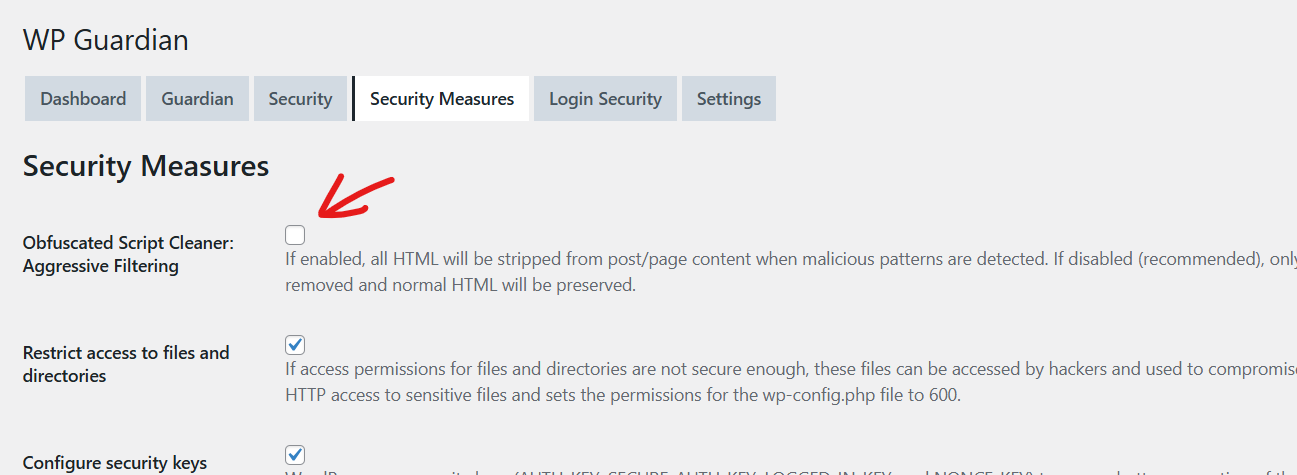
Yes, I had a function there, running on every post/page save and cleaning up some malicious JS code, but I was checking everything, not only inside <script> tags, which I should have. It was set to a very aggressive setting.
I turned it off, and only I am now only scanning inside <script> tags. I had an attack on 400+ websites on Plesk, and this code cleaned everything, so it’s definitely working, but I did not test it with HTML mode.