I would like to offer a small contribution. I was working on making a site like ClassPress and began searching for a way to make the last menu item a CTA button. (It’s nothing fancy, this is a work-in-progress.) Here is my progress so far.
In my case, I viewed the source and used the menu class, which was “menu-item-73” and added the following custom CSS. Using this class means it is styled for all screens.
(Apologies, I didn’t know how to format active CSS in the post, so I took a screenshot.)
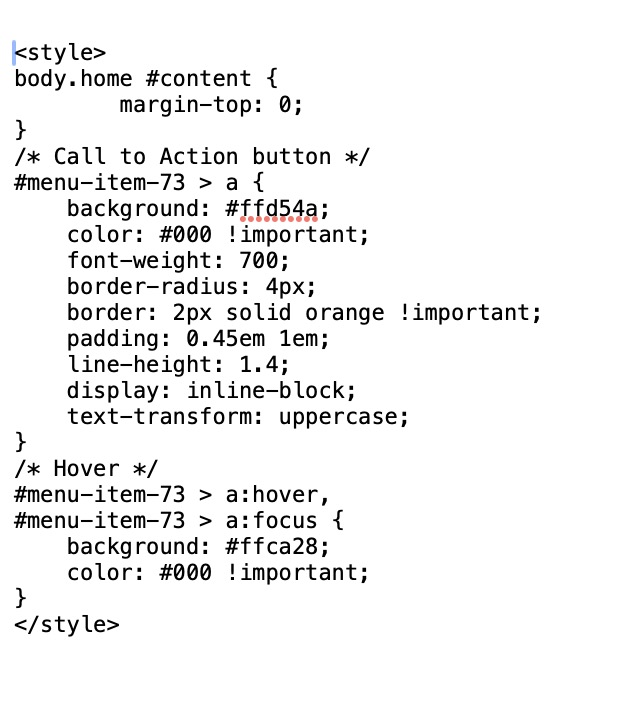

Thanks! To format code inline in these forums use a backtick both before and after the code string. To format code in a block, go to a newline and type three backticks. Then move to the next line and type your code. Then move to the next line and type three more backticks. Then, if you have more to say, move to a new line and type normally again.
That is definitely messed up, and if you have it like that in your website, it’s not gonna work.
See below:
body .home #content {
    margin-top: 0;
}
/* Call to Action button */
#menu-item-73 > a {
    background: #1td54a;
    color: #000 !important;
    font-weight: 700;
    border-radius: 4px;
    border: 2px solid orange !important;
    padding: 0.45em lem;
    line-height: 1.4;
    display: inline-block;
    text-transform: uppercase;
}
/* Hover */
#menu-item-73 > a:hover,
#menu-item-73 > a:focus {
    background: #ffca28;
    color: #000 important;
}