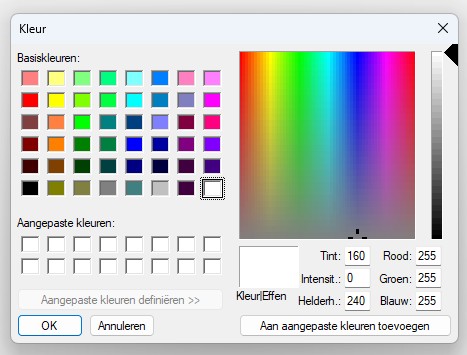
I’m working on a plugin to replace the jQuery color picker with the HTML5 color input type. Looks great in Edge and Chrome, but in Firefox another type picker is displayed, see below.
I use Firefox. Will try to understand that and come back to you since you are putting in the hard work to make it work. Might be that diving the docs I find something.
Relying on browser options for things like GUI-dependent widgets is a sure method to break your brain. Its a huge can of worms, with a shortcut to the dark dimensions / Cthulhu mythos.
Like, you want to pick up a fight with the whole Unix community challenge yourself with the whole Unix family, because the Browser implementation differs vastly from system to system (and yes, Mac OS X is also a Unix OS)? Not to mention that thats desktop only, you gonna have a lot more “fun” with different Android versions, browsers, iOS versions, SAFARI versions .. lets not start with Safari
And this is just all without mentioning accessibility issues ..
a11y can of worms
because some users - like me cynical grin - HAVE to rely on older browser versions or “exotic” browsers OR even “exotic” helpers solely because specific extensions or simple EASY support just doesnt exist (in 95% its because of the inherent ableism of society, but thats another can of worm I dont like to open here).
.. yeah, it really isnt worth the energy nor hassle. Speaking from harsh experience
cu, w0lf.
ps: I tried nicefying my text twice. but its really a very ugly topic, as soon as OS-dependent / browser-dependent GUI parts get involved.
This one looks nice and simple, lightweight as well, I like.
Indeed, had a similar issue when removing jQuery from a date picker.
Nowadays browsers do support the color and date input type and display a picker, but unfortunately there’s no standard re the layout and such.
I did start, at one point, trying to write some code to use Coloris in core instead of the current Iris color picker. But it would have been a breaking change, so that will have to wait.
For Core we should definitely not use the picker from the browser, although the Edge, Chrome and Safari picker look fine (and they keep improving them of course).
For a (small) plugin with a single or couple date/color input(s), I’m doubtful whether or not to include a third party picker script. Requires extra maintenance.
Core actually has to have a picker for the reasons @fwolf outlined: the browsers can’t be relied on to provide a consistent experience. It currently uses Iris.js, which requires jQuery, so it would be nice to replace it at some stage … just not yet.
This is just to note that version 2.8 of ClassicPress will be moving to use the Coloris color picker. It’s been included in the nightly release for a while now and is working well.