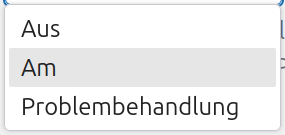
there are still some annoying bugs in the German translation and you notice them in daily use of CP.
What I am asking for is: In the Dashboard (English version) you see Post => Add new, in German you see Beiträge (correct) => Datei hinzufügen (wrong, because translation of ‘Add file’). The mouseover in the browser shows the post-new.php.
How do I find this exact string? There are some Add new strings translated with Datei hinzufügen.
Thanks for reporting, We use Crowdin for localization, and there is a way to find all instances and correct them all at once.
Basically you just open a file in Crowdin (no matter which one) and you use the contextual search to look for the string - ensuring you apply the search to all the locale you are in at that moment. In this case you also want to make sure it’s the strict string Add New.
The search is going to find all of them everywhere in the locale, at that point you edit the ones that are incorrect and approve the translation. after that you need to also mass approve the review.
Once that is done, you just drop a mention to Matt in the i18n channel to signal that a new update for that locale is complete with corrections and the locale will then be released at the earliest moment possible.
If you are interested in doing this yourself I can give you access to Crowdin locale at localizer level so you can translate/review - otherwise I can take care of that. Let me know what you prefer.
Thanks for your kind answer. I am already using Crowdin.
So I have to be more precisely: I already know how to find strings like ‘Add new’ or the translated strings. But is there a way to find a special source string, e.g. like used in the post-new.php e.g ? This is what I can’t find within Crowdin.
At the moment there are bugs like this: English version Posts => Add new is retranslated from German versionPosts => Add new file. Pages => Add new shows the same Pages => Add new file. Plugins => Add new file the same. Which shouldn’t be like this.
The (German) translation must take certain linguistic contexts into account.
Oh let me post another example: How do I find the term ‘Am’ (as sIngle word), which should be ‘An’ instead.
Searching the string show a lot of ‘am’ in German translation, but not the single one. (The term is used in dropdown list in Preferences => Block compatibility …)
this is the specific way you can search. Managers have more capabilities in that regard. Crowdin is very very precise in managing who can do what and sometimes it is frustrating.
That is why I advised you to search for the exact string and either mass change the ones needing correction or go one by one.