I went looking for a full-width child-theme and the only ClassicPress tutorial is a full-width page for making a child of Twenty Seventeen! What? Where is the tutorial for a single-column of ClassicPress? Thanks!
Hi,
That tutorial is for setting up the child theme itself. We used a default theme as example. Afterwards it’s up to you to add the changes you want.
what I think they meant is a specific tutorial based on the The ClassicPress Theme - However to be clear the process is the same for every theme you want to make a child theme for.
To make a full-width page template you take the standard page template with sidebar and copy it in the child theme calling it page-full-width.php and just remove the sidebar call to it. then add some CSS to the child theme to avoid ugly styles.
1 Like
ElisabettaCarrara,
You are correct and I appreciate your help.
I am using a child theme of my own. (I also edited the CP theme to remove widgets and add the full-width, and custom CSS).
I followed the tut on WPBeginner. I have made a second attempt, but also without results.
I tried full-width and page-full-width pages. I double-checked, and removed some block widgets (how did those get there?) from that space, but now have a blank space where the sidebar would be.
https://wp.bryclaw.com/ for the curious.
You have to add a class to the full width page because it’s using the CSS of the page with sidebar. Then you have to style that class to use the full-width. I might have my own copy of the CP theme with the changes you need somewhere… I recall making a child theme. Later I will find it and link it here.
1 Like
@RanWest GitHub - ElisabettaCarrara/the-classicpress-theme-child: Child theme for The ClassicPress Theme with prefooter (footer menu on left/social menu on right), footer with three widget areas, no hardoced CP credits, after footer with theme credits, full width page template · GitHub here it is.
It contains a tutorial describing more or less what I did to make it so.
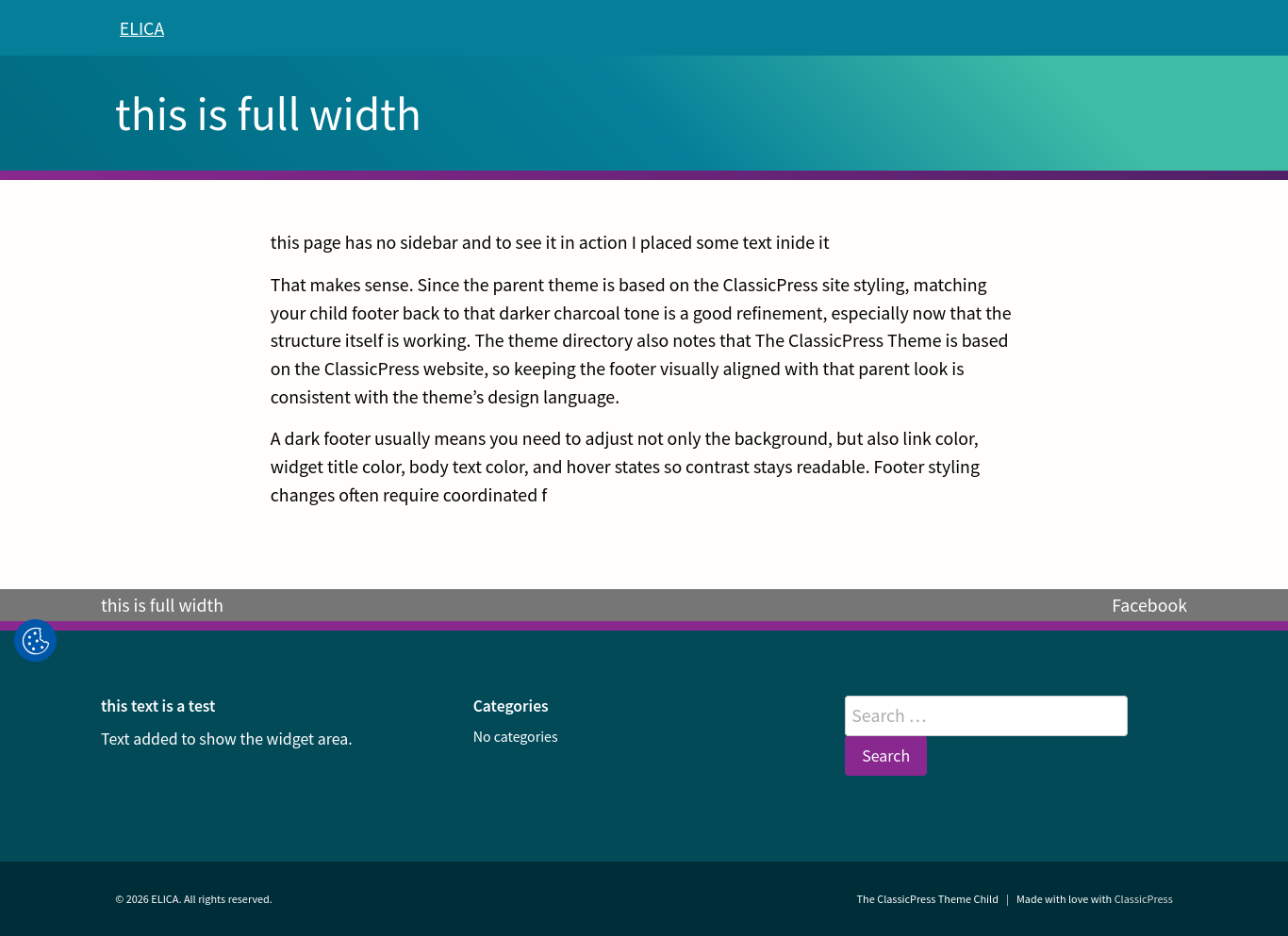
the theme has a prefooter with footer and social menu, a footer with three widget areas and under that the theme credits (made with love with CP basically) - moreover it sports a full-width page template. See screenshot below for reference.
All of that maintaining the “theme branding” and oveall styling.
Hope that helps. 
EDITED TO ADD: in the coming days I might add to this repo the CP workflows and list this in the directory if people see a need for that.
1 Like
Please note that I have already added a footer widget area to The ClassicPress Theme.
You don’t need a child theme for that anymore 
I’m also willing to add an extra page template for full width pages, but because @timkaye is main author of the theme, he should agree.
2 Likes
I think every variant of it is welcome - my version has a prefooter and a section for theme credits after footer. In that sense is different from a footer that only has the widget areas
1 Like
Go ahead, @Guido07111975 !
1 Like
Great, I’ve created a PR.
2 Likes
Ta-DA!
“It’s been a long while since I played with builders. There’s a page width setting inside the FX Builder settings!” he said, while rubbing his hands together.
2 Likes
Yes, please! Thank you.