Requires CP: The lowest ClassicPress version that the plugin will work on.
This field only works if the plugin is stored on the ClassicPress Plugin Directory.
If set, plugin updates from WordPress are disabled, in favour of updates from the ClassicPress Directory Integration plugin (if installed).
This header is for internal use, so for plugins and themes listed at the CP Directory and for CP compatible plugins and themes not listed at WP org. Other plugins and themes could (should) use the WP header Requires at least. But this says nothing about the CP version the plugin or theme supports.
The description in the docs should perhaps be more clear, I can update it.
But good point, make the CP version header not block updates from WP org. So more plugins can use the CP version header. If I’m not mistaken this was originally build this way, to block WP from updating a CP specific plugin with the same name. If I’m right, and we remove the block, this also means there must be found a solution for this updating thing.
How about it doesn’t break the usefulness for plugins not hosted on your repo and it just works the same way as the WP header does.
All my plugins clearly state compatibility and CP says “maybe…”
There is no maybe, I’m literally telling it what the compatibility is.
Like so:
/*
Plugin Name: No-Bot Registration
Plugin URI: No-Bot Registration for WordPress and ClassicPress › AJdG Solutions
Author: Arnan de Gans
Author URI: https://www.arnan.me/
Description: Prevent people from registering by blacklisting emails and present people with a security question when registering or posting a comment.
Version: 2.5.1
License: GPLv3
Text Domain no-bot-registration
Domain Path: /languages
If you want updates to come from another repo, the initiator for that should be when people install the ‘Update from CP repo plugin’. Not when this header is included.
`Requires CP` header is not sent by WordPress API, so it can’t be a way for telling ClassicPress that the plugin you are about to install (or update) is 100% compatible.
If there is no `Update URI` header (but `Requires CP` is set), the `Update URI` is automatically set to point to ClassicPress directory, so the integration plugin can handle updates.
You see the headers I stick in my plugins (previous post).
I do not have the integration plugin. Updates come through fine, from wordpress.org.
But that’s NOT the issue here.
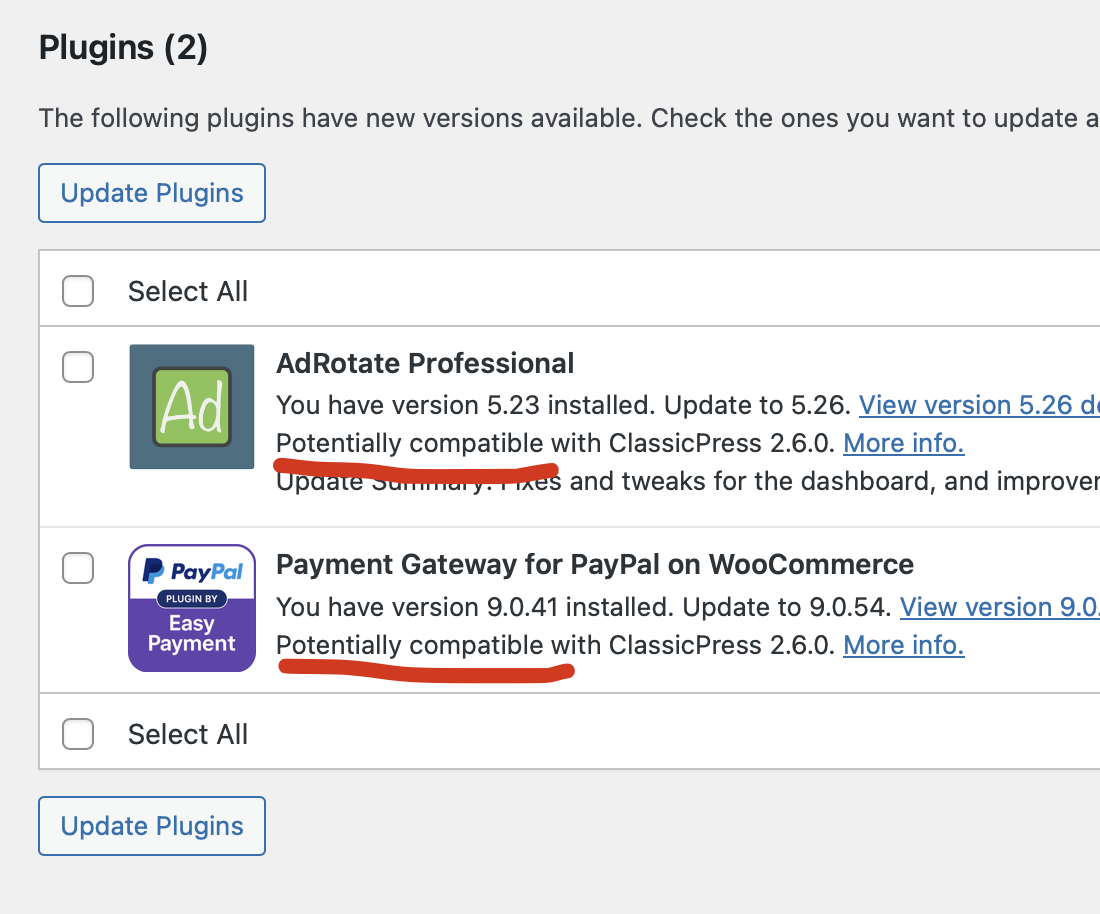
The issue is that CP mishandles the ‘Requries CP’ header and tells users that my plugins are “maybe compatible” even though the header clearly indicates they ARE compatible.
And why? Just because my plugins aren’t in your repositories? That’s just poor logic and renders the header pretty much useless.
It’s also illogical because even if I have the integration plugin and the header, my plugins still aren’t on your repository, and thus STILL won’t get the correct compatibility indicated - according to your docs.
I don’t set Update URI. I shouldn’t have to. That’s for ‘custom’ servers. In Classicpress, the CP repository shouldn’t be considered ‘custom’. Even more so since if done right, the integration plugin can easily handle where updates are coming from. It can simply do so by recording which plugins are installed through it and keep that in mind when doing update checks - Just like the hub2wp plugin does - without messing up the function of the compatibility header or making (wrong) assumptions based on its presence.
Come to think of it, the hub2wp plugin can replace your repository entirely if it would support the correct tags/headers (maybe it already does) since that too downloads stuff from github.
Alternatively, like I do with my own update system, you can introduce a new header that if present (or has a certain value) makes the integration plugin look for updates on your CP repo. That would leave the Requires CP header free to just be a simple indicator, without hidden functions. Yes, you could in theory use the ‘Update URI’ header for this, but that will probably only confuse WP since it’s their header. And that doesn’t fly with true custom servers, which will have their own implementation that would then clash with yours.
Or or or… If you don’t want to change anything technical… Simply change the wording in the dashboard and stop sowing uncertainty among users.
Also, as a sidenote, notice how WP isn’t at all relevant in this issue - I don’t know why everyone so far keeps mentioning using their headers or their api response not sending CP stuff or whatever.
See screenshot. The Paypal plugin isn’t mine and as far as I can tell it doesn’t declare compatibility, so that’s fine. But AdRotate Pro DOES declare the header.
It also gets updates WITH the Require CP header in the files. All my plugins get updates. Either from wordpress.org or my own server. And that’s also fine… The Requires CP header should not meddle with that. It should just accurately indicate compatibility, nothing more.
“Potentially compatible” is related to the new version, and CP at that point can’t look at the Requires CP header. Potentially because the plugin states compatibility with WP 6.2, but can use react or some block-related functions in the new version, so it’s not 100% guaranteed.
So then the only way to know for sure is to get the integration plugin is what you mean?
Guess I’ll need to update my server to send a compatible response to not see this message then…
On this test site I do not have my update plugin (GooseUp) installed. This version has it’s own updater built-in. Doing a stock check, but the url is swapped for my server.
Just plain CP 2.6 doing updates as it should.
Before I started looking into this I didn’t even know the Requires CP header had any function beyond showing a version number for compatibility - I’ve been updating plugins, with the header in it, as normal since CP 1.x.
I guess that if you have your own update system you are changing the update_plugins transient, that is why Update URI - related filter (that comes first) is not blocking your updates.
here there is a misunderstanding.
You CAN host CP plugins in WP repo - YES. and in that case you are right YOU DO NOT NEED REQUIRES CP.
You ONLY require that header when you host your software on GitHub and decide to LIST IT in the CP plugins/themes directory that LINKS to the zip asset of your release on GITHUB to serve the updates and whatnot while listing your plugin (NOT HOSTING IT DIRECTLY) - that is because the directory has to show THE REQUIRED VERSION of CP (some plugins developed for v2 do not work in v1 for example).
So IF YOU ONLY HOST YOUR PLUGINS ON WP that header is not needed - but if you use it you can tell people what is the version of CP that your plugin works on.
If you want to both host it in WP repos and list in CP that header as others have explained is necessary to avoid WP repos to override the CP copy.
But the setup in the screenshot only checks for AdRotate Pro, if I install another plugin which doesn’t not have it’s own update code - Like ‘No-bot registration’ - still gets updates. But that’s fine.
We have just updated the description of the 3 mentioned headers (Requires at least, Requires CP, Update URI). See the doc. Hopefully it’s more clear now, although there’s a difference of opinion.
I kinda didn’t consider CP needing to be able to read the header to show an accurate reading at first. But the way you put it now makes the header even more useless for plugins like mine. Is the header then not used in any meaningful capacity outside of the CP Repo at all?
the header is used ONLY in the CP directory.
DIRECTORY is a place that lists plugins hosted in a GitHub repo that do have the correct headers for CP and a ZIP asset packaged with the provided GH action.
REPO is the WP repo and hosts the code directly via SVN - the header if you host your plugins only there can be avoided since they will update from WP.org
That is why they update correctly. Just because they are served from WP Repo.
Originally the header was also intended to avoid having to different plugins with same name in two different places because WP.org in that case would override the directory one (you can try, upload an HelloDolly to CP directory with some code different from the HelloDolly from WP then try updating it and it will be changed it into the WP one without correct CP headers telling it to update only from CP dir listing - I had it happen with the first theme I tried to develop and I discovered I lost all my half-assed code to WP in a glitch because I was stupid).
The naming risk is real - there are a gazilions plugins over at WP repos and it could happen that someone uses a name that already exists for their software listed on the directory and that issue was discussed and solved by enforcing that particular set of headers when the issue presented itself. And since it basically works I wouldn’t change it.
That said, there are some options:
host on WP, no need for the header. Consider discoverability however because for CP at least it might decrease (slowly but surely one day in the far away future people will rely more on the directory than the repos for CP and that is only the natural course of evolution because WP is diverging so fast that one day or another I will get whiplash)
list on the directory - consider that this is very ideal if your plugin is CP only, not so much if you distribute it to WP users as well because again “discoverability”
use the same code and list on both - in this case you definitely need the headers and to stay on the safe side maybe use different names (maximum discoverability in a way)
Host the software on your own and distribute it (I think I have seen discussion around about Troy… you can use it to transform your site in a full fledged independent solution to distribute your software) - discoverability depends on your marketing strategy
host on FAIR independent repos (works with CP) - again not a great discoverability since it is only their start but a good project I think and in the future their discoverability rate might increase with the increase in software hosted. I do not know however how do they manage the software submission to the platform since I am not interested in them but I linked their main site so you should find all the info there and see if they want some special headers.
About Troy and FAIR people are starting to ask why don’t we create our own repos - aside from the fact that we have our own directory we would not like to repeat WP.org mistakes. (about that look around on the forum for convos happened in late 2018 early 2019 to understand - also other talks during the years on the topic you can find on zulip among the archived convos and here)
Yeah ok. I thought it would be useful, like the WP one. What a letdown…
I’ll remove it from my plugins shortly. No point in including compatibility info if the system won’t use it - or does weirdo overrides with downloads because of it (I think that bit is broken though, but whatever…)
Today I’ve been experimenting to include the ‘requires_cp’ in the api response, so CP can use that for update information from my server (alongside requires_wp), but it won’t even recognize that without your integration plugin thing I think… So even that was a waste of several hours of error after error.
This is not the first discussing (at forum, Zulip and even GitHub) about these headers and compatibility. So hopefully we can improve these compatibility checks in 2026.
There’s also a ClassicPress tag for WP plugins by the way. I suggested to use that tag to let CP know the (WP) plugin is (potentially) compatible (potentially, because it doesn’t return the CP version of course). But including this in core seems to be difficult.


 you can use it to transform your site in a full fledged independent solution to distribute your software) - discoverability depends on your marketing strategy